Visiting Al-Rawdah Al-Sharifiyah in Madinah is a special part of many Muslims’ Umrah journeys. Located inside the Prophet’s Mosque (Al-Masjid an-Nabawi), the Rawdah is the blessed area between the Prophet Muhammad’s ﷺ house and his minbar. If you are travelling from the UK, arranging your visit in advance can help you plan your time in Madinah with greater confidence.
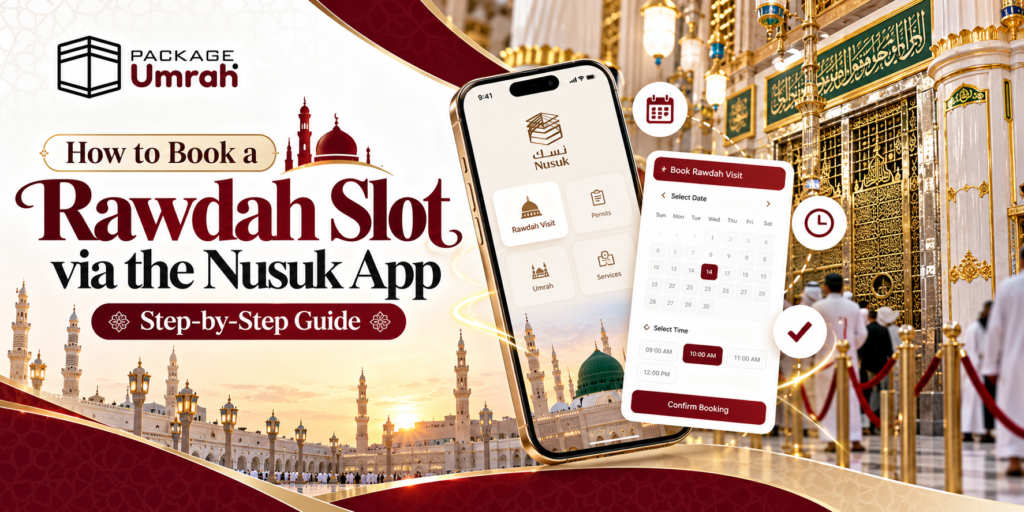
To book a Rawdah slot, download the official Nusuk app, sign in, open the Rawdah section, select the appropriate prayer permit for men or women, choose an available date and time, add eligible companions if needed, and confirm your booking. The permit is free, but appointments depend on availability.
Package Umrah has put together this comprehensive, step-by-step guide that explains how to book a Rawdah appointment through Nusuk, what to prepare before travelling from the UK, how to handle unavailable slots, and what to do when you arrive at the Prophet’s Mosque.
What Is the Rawdah and Why Do You Need a Permit?
Al-Rawdah Al-Sharifiyah is a designated area inside the Prophet’s Mosque in Madinah. Muslims visit to offer prayer and engage in worship in this deeply significant place.
A Rawdah permit is an appointment authorisation that regulates access to this particular area. It helps manage visitor numbers and maintain an orderly experience.
It is important to understand the difference between visiting the mosque and entering the Rawdah:
- Visiting the Prophet’s Mosque: General entry to the mosque does not ordinarily require a Rawdah appointment.
- Praying inside the Rawdah: You should obtain the required permit through the official Nusuk service.
- Visiting the Prophet’s Mosque from the UK: You can include time at the mosque in your Madinah itinerary even if you have not secured a Rawdah slot.
The Rawdah booking service is free. Avoid unofficial websites or individuals who charge a fee simply to issue a permit that is available through the official platform.
How to Book a Rawdah Slot on the Nusuk App
Follow these steps to request your appointment. Menu labels and booking options can change as Nusuk updates its services, so follow the wording displayed in your current version of the app.
Step 1: Download the Official Nusuk App
Install the official Nusuk app on your smartphone before travelling to Saudi Arabia if possible. Use the Apple App Store or Google Play Store and check that you have selected the official application.
Nusuk provides services for pilgrims and visitors, including Rawdah prayer permits. Its services are available in English as well as Arabic, making it practical for many British pilgrims.
Before downloading, check that:
- Your phone has sufficient storage and battery.
- You have a reliable internet connection.
- You can access your email and mobile number.
- Your phone’s operating system and app are up to date.
Step 2: Create an Account or Sign In
Open Nusuk and follow the registration or sign-in instructions presented on screen. Enter your details accurately and complete any verification the app requests.
Use your own information and the correct details from your travel documents where required. If you are travelling on a British passport, ensure your identity details are consistent with your passport and any relevant Saudi travel documentation.
Tip for UK pilgrims: Set up and test your account before departure. Resolving login or verification problems at the airport or after arriving in Madinah can be stressful.
Step 3: Open the Rawdah Section
Once you reach the home screen, look for the Rawdah section or the service labelled “Rawdah Prayer Permit”.Select the relevant service for your visit. Nusuk distinguishes between permits for men and women, so choose the correct option for the person who will be entering the Rawdah.
If you cannot find the option immediately, check that the app is updated and review the available services. The exact layout may vary between app versions.
Step 4: Select Companions, If Applicable
The app may allow you to select or add eligible companions when arranging a booking. Follow the instructions shown and check the details of each person before proceeding.
For families travelling together, remember that men and women may have separate appointment windows. Do not assume that every family member can enter at the same time.
Each visitor should have the appropriate booking or authorisation required by the system. Confirm the arrangements for children directly through current official guidance, as access conditions can change.
Step 5: Choose an Available Date and Time
Browse the dates and time slots displayed in the app. Select an appointment that fits your Madinah itinerary and any available gender-specific visiting window.
Availability can change, and popular dates may be difficult to secure during Ramadan, school holidays and other busy periods. Book as early as the system permits rather than relying on finding a slot at the last minute.
Step 6: Review Your Booking Details
Before confirming, carefully check:
- Your selected date and appointment time.
- The permit type for men or women.
- The visitor or companion details.
- Any instructions or conditions displayed by Nusuk.
Correct any errors before proceeding. If your preferred time is unavailable, return to the calendar and select another suitable appointment.
Step 7: Confirm and Save Your Permit
Follow the on-screen instructions to confirm or issue the permit. Once the booking is successful, check that the appointment appears in the app.
Keep the confirmation accessible and review the permit details, including the entry instructions and any QR code provided. Take a screenshot for convenience if appropriate, but do not rely on a screenshot alone if the app requires you to display a live permit.
Important: A selected time is not the same as a confirmed appointment. Make sure the app shows a successfully issued permit before assuming your visit is booked.
What Documents and Details Should UK Pilgrims Prepare?
The information required can vary according to the account type and the current Nusuk process. Preparing your details beforehand can make registration and booking easier.
| What to Prepare | Why It Helps |
| Valid Passport Details | Helps you enter accurate identity information where requested. |
| Saudi Visa or Relevant Travel Details | Useful for checking that your travel arrangements meet current requirements. |
| Accessible Email Address | Allows you to receive verification messages if requested. |
| Working Mobile Number | Helps with account verification and notifications. |
| Smartphone with Nusuk Installed | Gives you access to the booking and permit details. |
| Internet Access | Allows you to sign in and check your appointment. |
| Confirmed Madinah Itinerary | Helps you choose a realistic visit time. |
Do not assume that every document in this table must be uploaded to the app. Follow the current official instructions for your specific account and circumstances.
Is the Rawdah Permit Free?
Yes. The official Nusuk Rawdah permit service is free. You do not need to purchase a paid appointment from an unofficial agent.
If a third party offers to help you use the app, distinguish between assistance with your travel arrangements and a charge for the permit itself. A legitimate Umrah travel agency may charge for its wider travel services, but the official Rawdah booking service does not have a permit fee.
When Should You Book Your Rawdah Appointment?
The best time to request a slot is as soon as you are eligible to book and your travel dates are sufficiently clear. The availability displayed in Nusuk is the most useful guide to the appointments you can actually select.
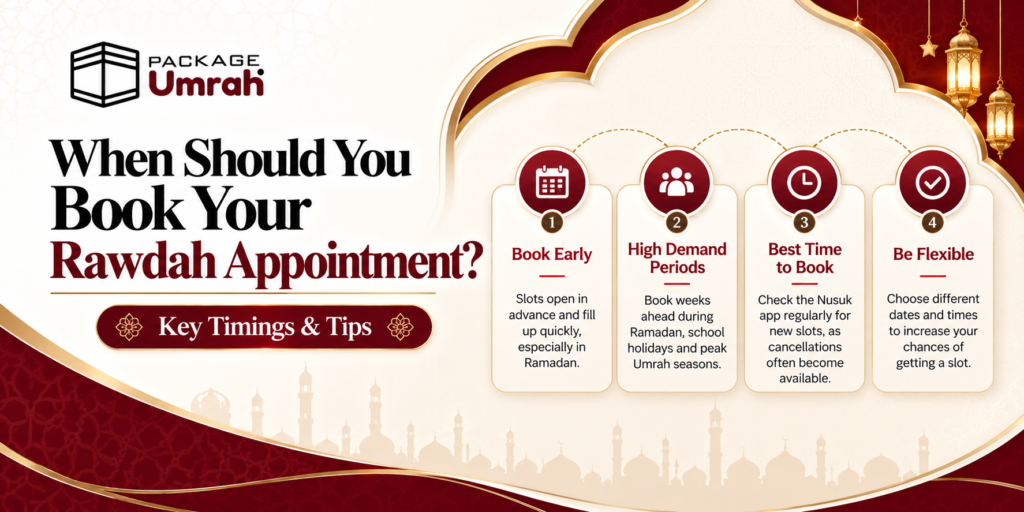
For UK pilgrims, these practical steps can help:
- Before departure: Install the app, sign in and familiarise yourself with its layout.
- Once eligible: Check the Rawdah calendar and book a suitable available appointment.
- Before travelling to Madinah: Recheck the permit, date, time and entry instructions.
- During busy periods: Keep your itinerary flexible in case your first-choice appointment is unavailable.
There is no guarantee that a particular date or time will be released or remain available. Avoid relying on unofficial claims about fixed release times unless Nusuk itself confirms them.
What If No Rawdah Slots Are Available?
Seeing no available appointments can be disappointing, particularly if you have travelled a long way for Umrah. However, it does not necessarily mean that you will be unable to visit the Rawdah.
Try the following steps:
- Check the calendar again: Availability can change, so revisit the official app periodically.
- Consider alternative times: If your itinerary allows, look at other dates or appointment windows.
- Check the correct permit category: Make sure you selected the appropriate service for men or women.
- Review your account: Complete any outstanding verification or required steps.
- Look for an official alternative: Nusuk may offer an instant or “immediate path” service for eligible visitors near the Prophet’s Mosque, depending on availability and current rules.
If you cannot secure a Rawdah slot, you can still visit the Prophet’s Mosque for prayer and worship in the areas open to visitors, subject to the mosque’s current arrangements.
What Should You Do on the Day of Your Rawdah Visit?
Knowing what happens at the ground level ensures you remain calm, organized, and spiritually focused.
Timing is Everything: Arrive at the designated assembly gates (typically Gate 37 for men or Gate 24 for women, though gates can change based on crowd management directives) at least 15 to 20 minutes before your allotted time slot. Security will turn away pilgrims who arrive too early or too late.
Document Inspection: Have your Nusuk app open and ready. Security officers will scan your QR code and cross-check it against your physical passport.
Etiquette in Al-Rawdah: Maintain composure, lower your voice, and avoid pushing or rushing. The carpeted area distinguished by green pillars marks the blessed Rawdah. Spend your time in sincere du’a, recitation, and sending salutations upon the Prophet (ﷺ) and his two companions, Abu Bakr (RA) and Umar (RA).
Common Nusuk App Problems and How to Resolve Them
The Nusuk app will not let me sign in
Check your internet connection, verify your login details and update the app. If verification is required, follow the official process. Avoid repeatedly creating new accounts as a first response.
The Rawdah calendar shows no dates
Try other dates or times and check again later. Appointment availability is controlled by the official service, so a travel agent cannot guarantee a slot that is not offered by Nusuk.
I selected a slot but cannot see a permit
Return to the booking or permit section and check the status. A selection that was not successfully confirmed should not be treated as an issued permit.
My QR code is not visible
Open the confirmed booking and follow the instructions displayed in the app. If the permit is not appearing as expected, use official Nusuk support rather than relying on an unofficial screenshot or a third-party promise.
My travel plans have changed
Review the permit’s cancellation or modification options. If you cannot attend, cancel it when the system allows and follow the current instructions. Do not assume that an unused permit can automatically be transferred to another date or person.
For account-specific or technical issues, consult the official Nusuk Umrah platform rather than sharing passwords or verification codes with strangers.
Planning Your Madinah Stay with Package Umrah
Arranging your Rawdah visit is one part of preparing for Umrah. Your flight timings, hotel location, transfers and number of nights in Madinah can also affect how comfortably you plan your visit to the Prophet’s Mosque.
At Package Umrah, we help UK pilgrims explore Umrah travel arrangements suited to their dates, accommodation preferences and budget. Our package options can include flights, hotels, visa assistance and transfers, depending on the itinerary selected.
Explore Umrah packages from the UK or contact Package Umrah for a personalised quotation. Our team can help you compare travel options and plan your stay in Makkah and Madinah.
Frequently Asked Questions: How to Book a Rawdah Slot via the Nusuk App
1. What is the Nusuk app and why is it mandatory for Rawdah access?
The Nusuk app is the official Saudi Ministry of Hajj and Umrah digital platform designed to regulate entry to the Two Holy Mosques. A Nusuk permit is legally required to enter Al-Rawdah Al-Sharifah (Riyadh ul-Jannah) in Al-Masjid an-Nabawi. Security guards scan the permit’s digital QR code at gate checkpoints to control crowds and maintain safety inside the mosque.
2. Is the Nusuk Rawdah permit free for UK pilgrims?
Yes, the Nusuk Rawdah permit is 100% free. Neither the Saudi Ministry of Hajj and Umrah nor official platforms charge any fee to download the app or book a visit. UK pilgrims should avoid third-party websites or agents claiming to sell guaranteed Rawdah permits.
3. How far in advance can I book a Rawdah slot on the Nusuk app?
Rawdah slots typically open 1 to 2 weeks in advance. Scheduled permits operate on a rolling release schedule, with new availability frequently dropping on Thursdays and Fridays around early morning (Saudi Standard Time) or between 11:00 PM and 2:00 AM UK time.
4. How many times can a pilgrim visit the Rawdah using Nusuk?
Under standard scheduled booking rules, international visitors holding an Umrah or Tourist eVisa can book one scheduled Rawdah slot once every 365 days per passport. However, “instant booking” or extra capacity-based slots may appear on the app if you are physically close to the Prophet’s Mosque in Madinah.
5. What are the specific Nusuk Rawdah visiting hours for women?
Visiting hours for women are strictly divided into specific daily windows to ensure privacy:
- Standard Days (Saturday to Thursday): Morning window (after Fajr until ~11:00 AM) and evening window (after Isha until ~2:00 AM).
- Fridays: Morning window (after Fajr until ~9:00 AM) and late-night window (after Isha until ~2:00 AM).
- Main Entry Gate for Women: Gate 24 or Gate 25.
6. What are the Nusuk Rawdah visiting hours for men?
Visiting hours for men are scheduled as follows:
- Standard Days (Saturday to Thursday): Early morning window (2:00 AM until Fajr) and afternoon/evening window (11:20 AM until Isha).
- Fridays: Early morning window (2:00 AM until Fajr) and daytime window (9:00 AM until Isha).
- Main Entry Gate for Men: Gate 37 or Gate 1.
7. Can I book one Rawdah slot for my entire family on a single account?
No. There is no bulk or family-wide permit. Every adult and teenager traveling on their own passport must have an individual permit issued under their name and verified ID. You can add companions inside your Nusuk account, but each person receives a distinct permit QR code.
8. What should I do if the Nusuk app displays “No Slots Available”?
If no slots appear for your Madinah dates:
- Refresh the app daily, particularly around late-night Saudi times.
- Keep checking once you arrive in Madinah, as pilgrims constantly cancel or adjust plans.
- Ensure your phone’s location permissions are turned on when near Al-Masjid an-Nabawi to unlock instant capacity-based openings.
9. Can children enter the Rawdah with their parents?
Young children (typically under 5–10 years old) linked as dependents on a parent’s visa file may accompany an adult permit holder. Older children holding individual visas and passports require their own separate Nusuk account registration and permit.
10. Does missing my scheduled Rawdah time slot affect my Umrah?
No. Missing or failing to secure a Rawdah slot does not invalidate or affect the spiritual validity of your Umrah. While visiting the Rawdah and paying respects at the Prophet’s Mosque is a highly rewarded Mustahabb (recommended) sunnah, it is separate from the compulsory rites (Fard and Wajib) of Umrah performed in Makkah.
